Designing a Data Source Discovery App - Part 24: Setting Up Your Discovery Project
by DL Keeshin
October 21, 2025
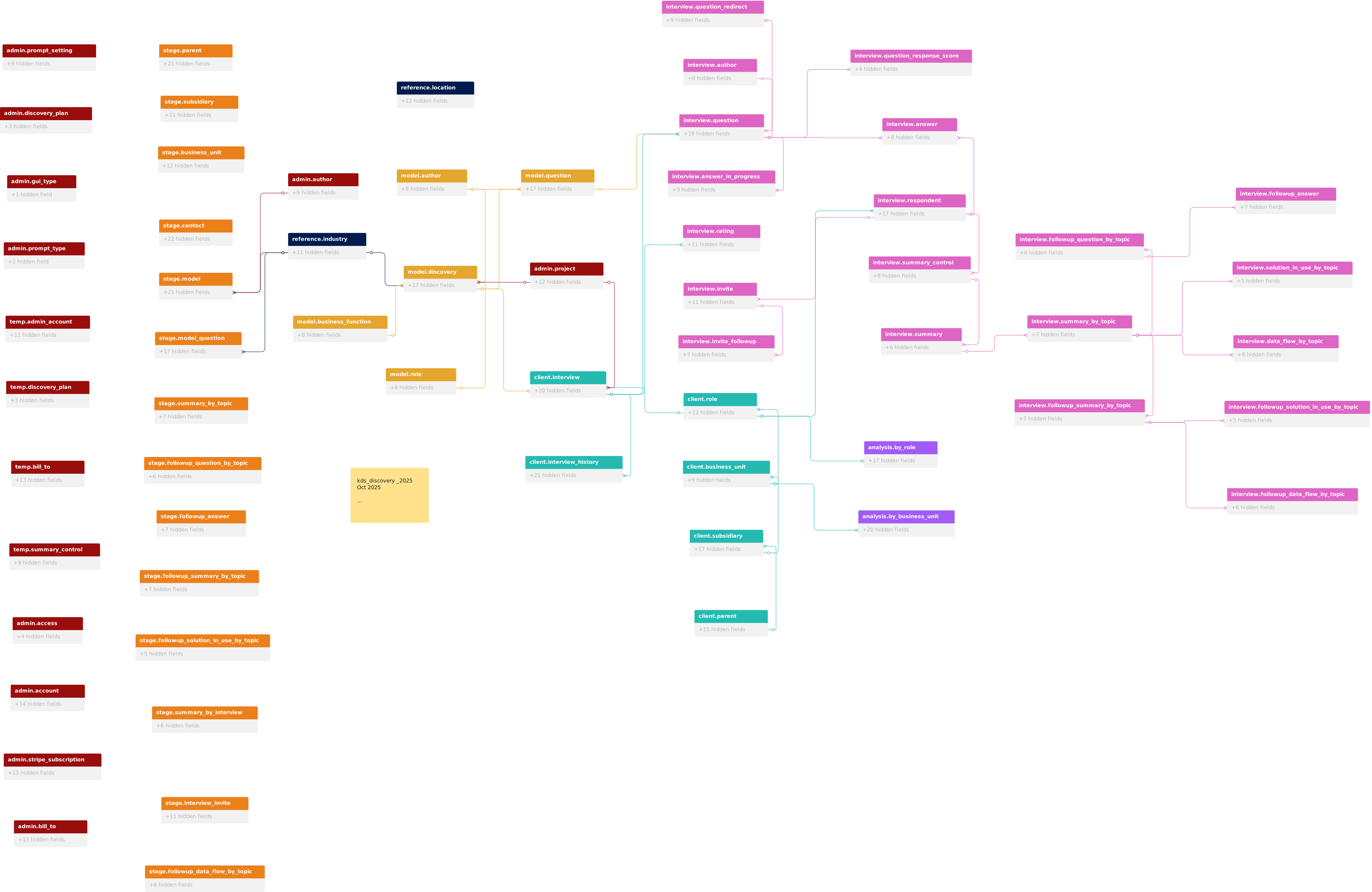
In my previous post, I described the comprehensive solution we've built with the kDS Data Source Discovery App. Today, I want to walk you through the practical side of getting started with the application. How do you actually set up a discovery project? What does the workflow look like for administrators and interview respondents?
Let me guide you through the initial setup process that transforms the kDS Data Source Discovery App from a powerful platform into a tailored discovery solution for your organization.
The Admin Dashboard: Your Command Center
Everything begins at the Admin Dashboard, your centralized control panel for managing discovery projects. The dashboard organizes key functions into logical groupings: Account Management, Configure Data, Analytics, System Management, Contacts & Interviews, and Quick Actions. This intuitive layout ensures that whether you're setting up your first project or managing multiple concurrent discovery efforts, the tools you need are always within reach.
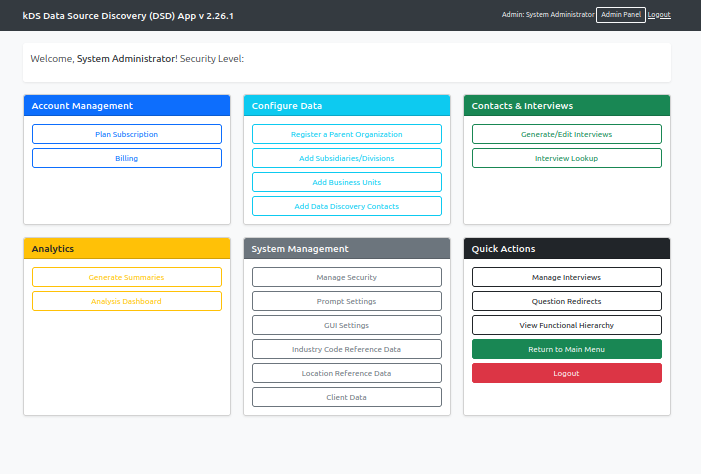
For initial setup, your primary focus will be on the Configure Data section, which provides the foundation for all subsequent discovery activities.
Step 1: Building Your Functional Hierarchy
The cornerstone of effective data source discovery is understanding your organization's structure. The kDS app uses a hierarchical model that captures this complexity through three interconnected layers: parent organizations, subsidiaries or divisions, and business units. This isn't just administrative housekeeping; it's the framework that enables the AI to generate contextually relevant interview questions.

Why Hierarchy Matters
Consider two different scenarios: a database administrator working in the healthcare subsidiary of a large conglomerate faces entirely different data challenges than a database administrator in the financial services division of the same company. The functional hierarchy captures these distinctions, allowing the AI to craft questions that reflect the specific industry context, regulatory environment, and business processes relevant to each respondent.
The Configuration Process
From the Admin Dashboard, the Configure Data section guides you through establishing this hierarchy. Start by registering your parent organization—the top-level entity that serves as the root of your organizational tree. Next, add subsidiaries or divisions representing major business lines, geographic regions, or operational segments. Finally, define business units at the most granular level—the teams and departments that own and operate data sources. Each layer captures distinct context that enables intelligent question generation.
The Business Keys: Industry, Business Function, and Role
This hierarchical structure generates what we call "business keys"—the combination of industry, business unit, and role that defines the context for each interview. When the AI generates questions, it leverages these keys to ensure relevance. A Senior Financial Analyst in the Corporate Services division gets questions aligned with financial data flows and reporting requirements. A Data Engineer in the Healthcare subsidiary receives questions focused on patient data systems and regulatory compliance.
This contextual targeting is what transforms generic data discovery surveys into intelligent, focused conversations that yield actionable insights.
Step 2: Identifying Your Subject Matter Experts
With your organizational structure established, the next critical step is identifying the people who hold the knowledge you're seeking to capture. These subject matter experts become interview respondents in the system.
The Contact Entry Process
From the Configure Data section of the Admin Dashboard, selecting "Add Data Discovery Contacts" opens a comprehensive contact entry form. This form does more than collect basic contact information; it establishes the contextual relationship between each respondent and your organizational hierarchy.
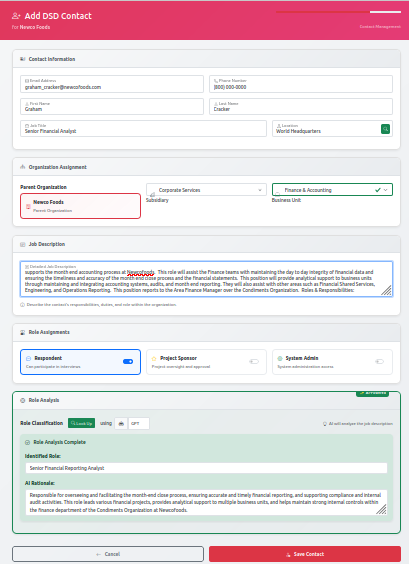
The form captures:
Contact Information: Standard details including name, email address, and phone number. The email address is particularly important, as it's where the system will send authentication tokens for interview access.
Organization Assignment: Here's where the functional hierarchy comes into play. You'll assign each contact to their specific subsidiary and business unit. This assignment determines which context the AI will use when generating their interview questions.
Role Assignment: The respondent's role is equally critical. Are they a Database Administrator, Data Analyst, Business Intelligence Developer, or Department Manager? The role designation, combined with their business unit and industry context, creates the complete business key that drives intelligent question generation.
Role Description and Analysis: The system includes a sophisticated role classification feature. When you provide a job title and description, GPT-4 analyzes this information to generate standardized role identifiers and detailed role descriptions. This ensures consistency across your organization while capturing the nuances of each position.
Strategic Contact Selection
Not everyone in your organization needs to be an interview respondent. Focus on individuals who:
- Own or manage critical data sources
- Perform regular data transformations or integrations
- Serve as technical subject matter experts for specific systems
- Hold institutional knowledge about data flows and processes
- Interact with data consumers or stakeholders
The goal is comprehensive coverage of your data landscape, not exhaustive coverage of your organizational chart.
Step 3: Interview Generation and Management
With your organizational hierarchy defined and respondents identified, you're ready to generate the interviews that will capture the knowledge you need.
Configurable AI Prompts: The Intelligence Behind the Questions
Before generating interviews, it's worth understanding the sophisticated prompt management system that powers question generation. The Prompt Settings Management interface, accessible from the System Management section, reveals the carefully crafted Jinja2 templates stored in the database.
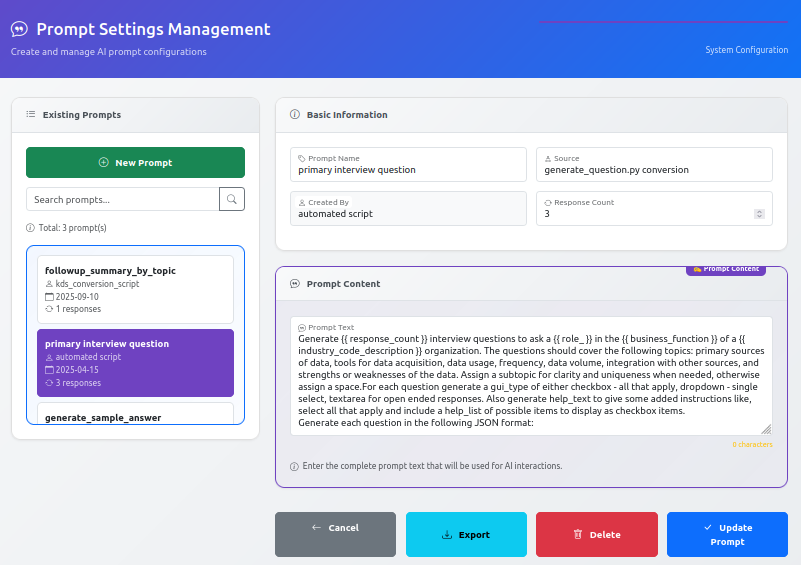
These templates aren't static; they're dynamic frameworks that incorporate variables like role, business function, and industry codes. When the AI generates questions, it pulls the relevant prompt template, populates it with context-specific information, and crafts questions tailored to each respondent's situation. The system maintains multiple prompt templates for different purposes: primary interview questions, follow-up summaries, and various analysis stages.
This configurability means organizations can customize the question-generation logic without modifying application code. Need to emphasize compliance considerations for healthcare respondents? Adjust the prompt template. Want to focus more heavily on data quality issues? Update the relevant variables. The prompt management system provides enterprise-grade flexibility.
Generating Your Interviews
From the Admin Dashboard, selecting "Generate/Edit Interviews" takes you to the interview management interface. The generation form requires several key decisions: interview model and topic for categorization, project selection, timeline configuration (request, approval, start, and end dates), and question generation count (6-24 questions per interview). You can also set interview frequency for one-time or recurring discovery efforts.
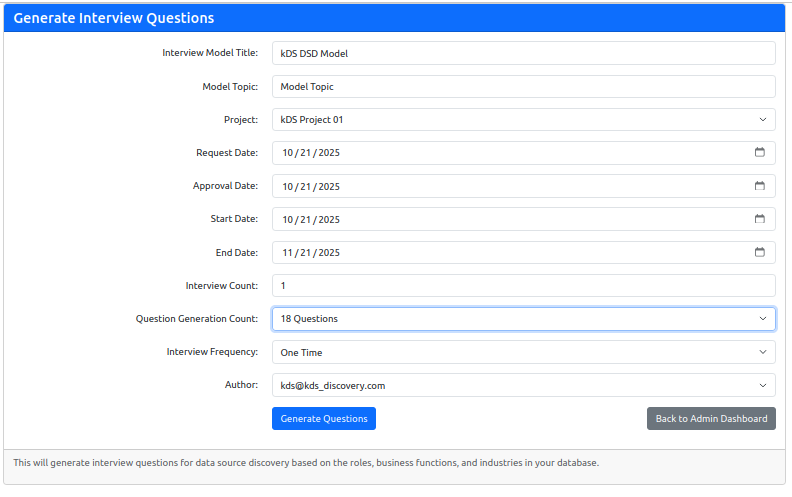
When you click "Generate Questions," the system retrieves the respondent's business keys (industry, business unit, role), loads the appropriate prompt template, and calls the OpenAI API to generate contextually relevant questions. These aren't generic survey items—they're intelligent probes designed to uncover specific information about data sources, transformations, flows, and business processes. Questions might explore data lineage, transformation logic, business rules embedded in data processes, downstream consumers, and known data quality challenges.
Step 4: Interview Delivery and Response Collection
Once interviews are generated, the system handles the logistics of delivery and authentication automatically.
Token-Based Authentication
Rather than requiring respondents to create accounts and remember passwords, the kDS app uses token-based authentication. When an interview is ready, the system generates a cryptographically secure UUID token and emails it to the respondent along with a direct link to their personalized interview page. This approach eliminates password fatigue, provides time-limited access (typically 7-14 days) aligned with interview windows, and simplifies the respondent experience to a single click.
The Respondent Experience
When a respondent clicks the link in their email, they're taken directly to their Interview Management page. This personalized dashboard shows their assigned interview, progress tracking, and clear action buttons to start or continue their responses.
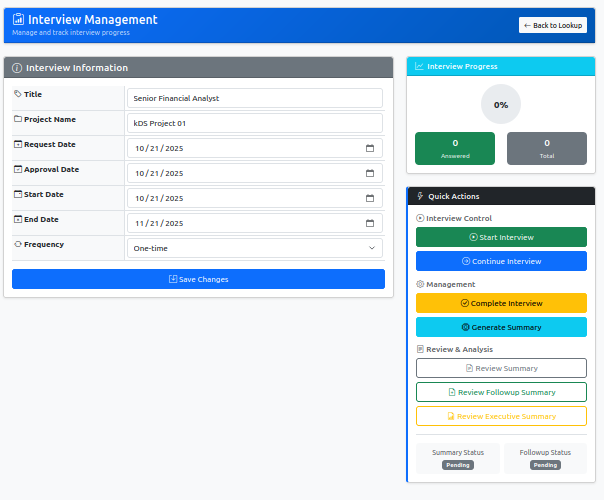
The interview interface presents questions one at a time or in small groups, with various response formats including text fields, dropdown selections, and checkbox options. The system saves progress automatically, allowing respondents to complete their interviews in multiple sessions if needed.
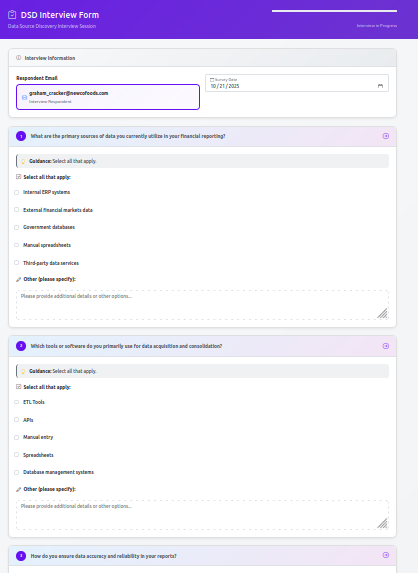
Real-Time Progress Tracking
Administrators can monitor interview completion status through the Interview Management dashboard. The system tracks which interviews have been started, how many questions have been answered, and which interviews remain incomplete. This visibility enables proactive follow-up with respondents who may need additional time or clarification.
The Path Forward: From Responses to Insights
Once respondents submit their interviews, the real magic begins. The three-stage AI analysis pipeline (which I detailed in my previous post) processes these responses, extracting structured data, identifying patterns, and generating executive summaries. But that's a topic for another post.
For now, what's important to understand is that the setup process—building your hierarchy, identifying your experts, and generating tailored interviews—creates the foundation for everything that follows. The care you take in these initial steps directly impacts the quality of insights you'll ultimately extract from your data discovery efforts.
Design Philosophy: Balancing Power and Usability
Throughout the development of the kDS Data Source Discovery App, we've maintained a consistent philosophy: enterprise-grade capabilities shouldn't require enterprise-level complexity to operate. The functional hierarchy model provides the AI with rich context for question generation, but you don't need to understand machine learning to set it up. The prompt management system offers sophisticated customization options, but the default configurations work effectively out of the box.
This balance—power without complexity, flexibility without confusion—defines the user experience we've crafted. Organizations can run their first discovery project with minimal configuration, then gradually leverage more advanced features as their data governance maturity evolves.
Real-World Setup Timeline
How long does this setup actually take? For a mid-sized organization:
- Hierarchy Configuration: 1-2 hours to map your organizational structure
- Contact Entry: 15-30 minutes per respondent (can be done in batches)
- Interview Generation: 5-10 minutes per interview (the AI does the heavy lifting)
From decision to launch, most organizations can have their first discovery project live within a few weeks, including time for stakeholder communication and respondent preparation.
What's Next
In upcoming posts, I'll dive deeper into the interview response and summary processes, the analysis pipeline that transforms raw answers into actionable intelligence, and the reporting capabilities that deliver insights to stakeholders. I'll also explore advanced use cases, including how organizations are using the kDS app for ongoing data governance rather than one-time discovery efforts.
Getting Started with kDS
If you're interested in experiencing the kDS Data Source Discovery App firsthand, we're actively expanding our beta program. We're particularly interested in working with organizations that have:
- Complex organizational structures with multiple business units
- Diverse data sources across different technology stacks
- An appetite for AI-enhanced data governance
- Willingness to provide feedback on features and functionality
Reach out at talk2us@keeshinds.com to learn more about participating in our beta program.
The journey from concept to functional platform has been long and challenging, but seeing organizations transform their approach to data discovery makes every iteration worthwhile. Thank you for following along as we continue to refine and enhance the kDS Data Source Discovery App.