Automating kDS Discovery Deployment: From Manual Setup to Three-Script Infrastructure
by DL Keeshin
December 2, 2025
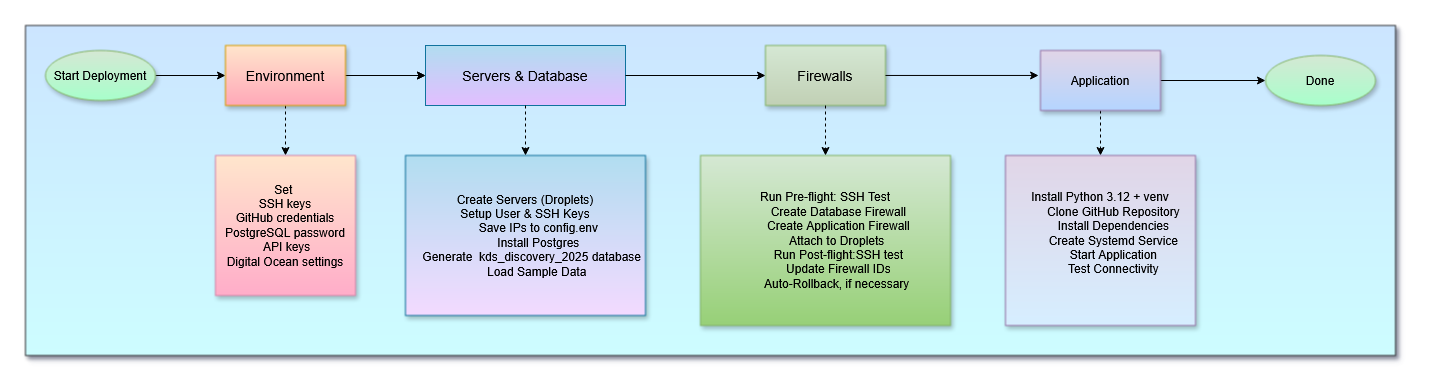
Building an enterprise-grade data discovery platform is one challenge. Making it deployable by anyone in 30 minutes is another challenge entirely. Today, I want to share how we transformed the kDS Data Source Discovery App from a complex manual deployment into a fully automated, production-ready infrastructure system—and the unexpected lessons we learned along the way.
The Deployment Challenge
The kDS Discovery App is sophisticated software. It requires PostgreSQL 16 for data storage, a Python/Flask application server with multiple dependencies, and secure networking between components. Traditionally, setting up such an environment would involve:
- Manual server provisioning and configuration
- Database installation and security hardening
- Firewall rule configuration
- Application deployment and dependency management
- Service configuration for automatic startup
- Testing and troubleshooting connectivity
For a typical IT professional, this could easily consume 2-3 days of work, with ample opportunity for configuration errors, security gaps, and deployment inconsistencies. We needed better.
Why Digital Ocean?
When selecting a cloud platform for kDS Discovery, we evaluated the major providers through the lens of our target customers: organizations looking to implement data governance with straightforward, cost-effective infrastructure.
Transparent, Predictable Pricing
Digital Ocean's straightforward pricing model was immediately attractive. A production-ready droplet (virtual server) costs $12-24 per month with no hidden charges, surprise bills, or complex pricing calculators. For organizations evaluating data governance solutions, this predictability matters immensely. You know exactly what infrastructure will cost before deploying a single server.
Developer-Friendly API
The doctl command-line tool provides clean, scriptable access to all platform features. Unlike more complex cloud providers that require navigating Byzantine IAM policies and multi-page API documentation, Digital Ocean's API is refreshingly straightforward. This simplicity was crucial for building reliable automation scripts.
Developer-Focused Philosophy
Digital Ocean's platform is designed for developers and organizations that value agility and simplicity over complexity. This approach aligns perfectly with our goal of providing straightforward data governance solutions. Rather than fighting against platforms optimized for massive enterprise deployments with layers of abstraction, we can leverage infrastructure designed for clarity and ease of use.
Excellent Documentation and Community
From Ubuntu server configurations to database optimization, Digital Ocean's tutorial library provided reliable, tested guidance. This community-driven knowledge base significantly accelerated our development process.
The decision wasn't just about features—it was about matching our solution to our customers' operational reality.
The Three-Script System
We designed the deployment automation around three focused scripts, each handling a distinct phase of infrastructure setup:
Script 1: setup_kds_servers.sh (682 lines)
Purpose: Database server provisioning and configuration
What it does:
- Creates Ubuntu 24.04 droplet for database hosting
- Creates Ubuntu 24.04 droplet for application hosting
- Installs PostgreSQL 16 with proper security configuration
- Configures network access (pg_hba.conf) for remote connections
- Creates kds_discovery_2025 database with complete schema
- Loads sample data for immediate testing
- Sets up Linux user accounts with SSH access
- Integrates with GitHub repository for database scripts
Time: 10-15 minutes
Script 2: setup_firewalls.sh (433 lines)
Purpose: Security configuration with intelligent rollback
What it does:
- Tests SSH connectivity before making changes
- Creates database firewall (SSH + PostgreSQL access)
- Creates application firewall (SSH + HTTP + HTTPS + Flask app)
- Attaches firewalls to appropriate droplets
- Tests SSH connectivity after applying firewalls
- Automatically rolls back if connectivity is lost
Time: 2-3 minutes
Safety feature: If firewalls block SSH access, script offers automatic removal to restore connectivity
Script 3: setup_app_server.sh (490 lines)
Purpose: Application deployment and service configuration
What it does:
- Updates system packages with retry logic for apt locks
- Installs Python 3.12 with virtual environment support
- Creates application user with proper permissions
- Clones kDS Discovery repository from GitHub
- Creates environment configuration with database credentials
- Installs all Python dependencies (Flask, psycopg2, gunicorn, etc.)
- Creates systemd service for automatic startup
- Starts application and verifies connectivity
Time: 5-10 minutes
Simple Three-Command Deployment
The entire deployment process requires just three commands, executed sequentially:
./setup_kds_servers.sh    # Database infrastructure
./setup_firewalls.sh      # Security configuration
./setup_app_server.sh     # Application deployment
Each script provides real-time progress updates with color-coded status messages, validates successful completion, and offers clear guidance if issues arise. The entire system operates on a simple principle: deployment automation should be reliable enough to trust, yet transparent enough to understand.
Configuration Management: The config.env File
All three deployment scripts share a single configuration file—config.env—that centralizes credentials, access codes, and infrastructure settings. This approach eliminates the need to repeatedly enter sensitive information while maintaining security through proper file permissions.
The configuration file contains:
- SSH Access: Key file location and Digital Ocean SSH key ID
- Network Configuration: Your workstation IP address for firewall rules
- GitHub Credentials: Username and personal access token for repository cloning
- Database Security: PostgreSQL password and connection parameters
- Digital Ocean Settings: Region, droplet size, and Ubuntu image selection
- API Keys: OpenAI and geocoding service credentials
- Runtime Values: Server IPs and firewall IDs (populated automatically during deployment)
A typical config.env structure looks like this:
# kDS Discovery Server Configuration
SSH_KEY_FILE="$HOME/key_file_name"
SSH_KEY_ID="12345678"
LOCAL_WORKSTATION_IP="local_workstation_IP"

GITHUB_USERNAME="your_username"
GITHUB_TOKEN="ghp_your_token"

POSTGRES_PASSWORD="secure_password"

DO_REGION="nyc3"
DO_SIZE="s-1vcpu-2gb"

OPENAPIKEY="sk-your-key"
GEOCODEAPIKEY="your-key"

# Generated at runtime (leave blank)
DATABASE_SERVER_IP=""
APP_SERVER_IP=""
DB_FIREWALL_ID=""
APP_FIREWALL_ID=""
This single-file approach streamlines deployment while maintaining security. The config.env file should never be committed to version control—it's explicitly excluded via .gitignore and should be secured with restricted file permissions (chmod 600).
The Journey: Discovering Firewall Quirks
Building production-grade automation revealed several undocumented behaviors in Digital Ocean's firewall implementation. Through systematic testing and debugging, we identified five critical syntax issues:
- ports:all converted to ports:0 - The "all" keyword was interpreted as port zero, blocking all traffic
- Plural vs singular syntax - Using
addresses:(plural) instead ofaddress:(singular) caused complete failures - Multiple addresses discarded - Only the last IP in comma-separated lists was retained
- IPv6 overriding IPv4 - Combined IPv4/IPv6 rules kept only IPv6, blocking all IPv4 traffic
- Unnecessary prefixes - Using
sources:anddestinations:prefixes broke otherwise valid rules
Each discovery refined our understanding and strengthened the deployment scripts. The final solution uses IPv4-only rules with explicit port ranges and direct address: syntax—simple, reliable, and thoroughly tested.
Deployment Architecture
The final architecture creates a secure, production-ready infrastructure:
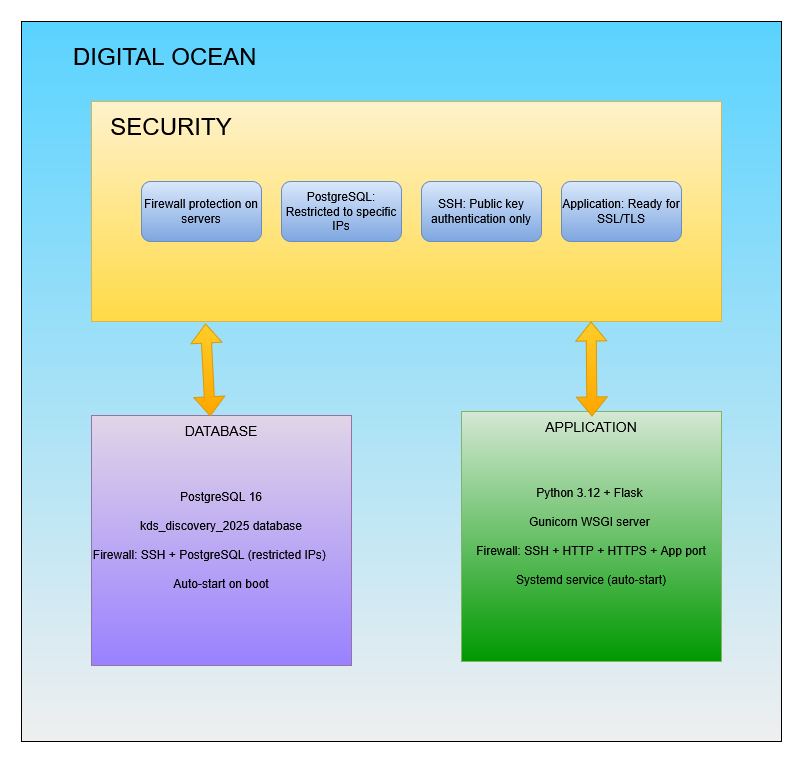
Safety Features: Production-Grade Reliability
The automation system includes comprehensive safety mechanisms:
Pre-flight Checks
Before making any changes, scripts verify SSH connectivity and server accessibility. If basic connectivity fails, deployment stops rather than creating partially configured infrastructure.
Automatic Rollback
The firewall script tests SSH access after applying rules. If SSH fails, it offers immediate rollback—automatically removing firewalls to restore access. This prevents the nightmare scenario of being locked out of your own servers.
Idempotent Design
All scripts can be safely re-run. They detect existing resources, remove conflicting configurations, and rebuild cleanly. This makes recovery from partial failures simple and reliable.
Comprehensive Logging
Color-coded status messages guide operators through each deployment phase. Errors are highlighted in red, warnings in yellow, successes in green. This clear visual feedback makes troubleshooting straightforward.
Retry Logic
System package updates include exponential backoff retry logic to handle transient APT lock issues—a common problem in automated Ubuntu deployments.
Real-World Deployment Timeline
From empty Digital Ocean account to running application:
| Phase | Script | Time | What's Deployed |
|---|---|---|---|
| Initial Setup | Manual (one-time) | 5 minutes | Create config.env with credentials and IPs |
| Database Server | setup_kds_servers.sh | 10-15 minutes | PostgreSQL 16 + database + sample data |
| Firewall Security | setup_firewalls.sh | 2-3 minutes | Both server firewalls with rollback capability |
| Application Deploy | setup_app_server.sh | 5-10 minutes | Flask app + dependencies + systemd service |
| Total Time | ~30 minutes | Complete production infrastructure | |
Compare this to traditional manual deployment: 2-3 days of work, significant potential for errors, and inconsistent results across deployments. The automation provides reliable, repeatable infrastructure in a fraction of the time.
Try It Yourself
The kDS Discovery deployment automation represents thousands of hours of development, testing, and refinement. It transforms complex infrastructure into three simple commands. If you're interested in experiencing this automation firsthand, our beta program offers hands-on access to the complete deployment system.
Reach out at talk2us@keeshinds.com to learn more about participating. We provide complete access to deployment scripts, documentation, and ongoing support for beta participants.
The journey from manual deployment to fully automated infrastructure taught us that the hardest problems often hide in seemingly simple details—like whether to use a plural or singular noun in an API parameter. These lessons strengthen not just our deployment automation, but our entire development philosophy: test thoroughly, document extensively, and never assume the "obvious" is actually correct.
Thank you for following along as we continue to evolve kDS Discovery from concept to production-ready platform. The automation story is far from over, but reaching this milestone makes every challenging debug session worthwhile.